Purpose: To help children, young people, adults and educators gain practical digital skills they can use in school, at home, in business and in everyday life.
Digital Learning is delivered through school digital learning activities and community digital learning activities. Sessions are practical. Participants are given time to use devices, practise tasks, ask questions and learn at a pace that suits their experience. We work with the equipment and connectivity available, and adapt activities where schools or communities have limited resources.
In the field
What this work looks like
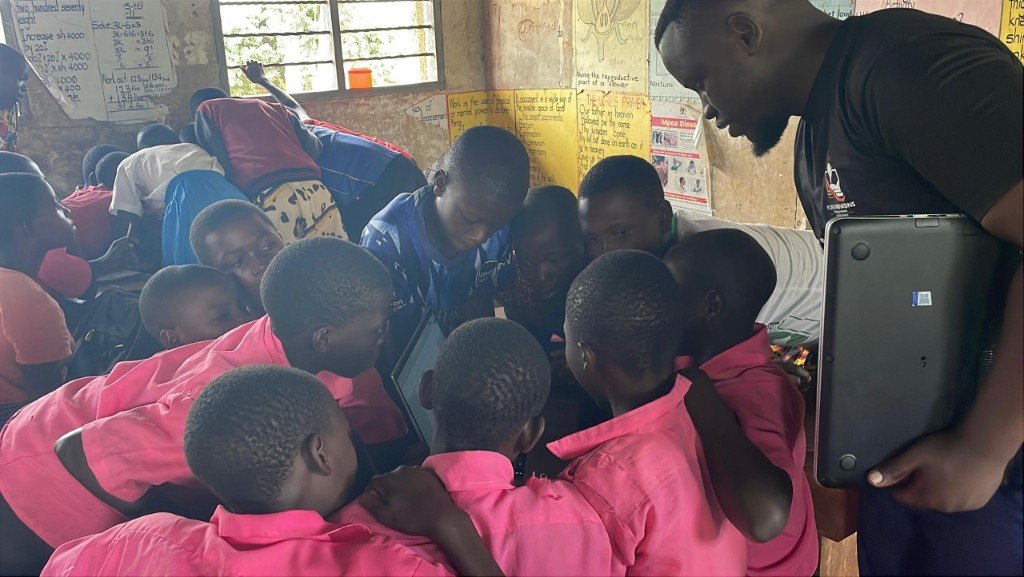
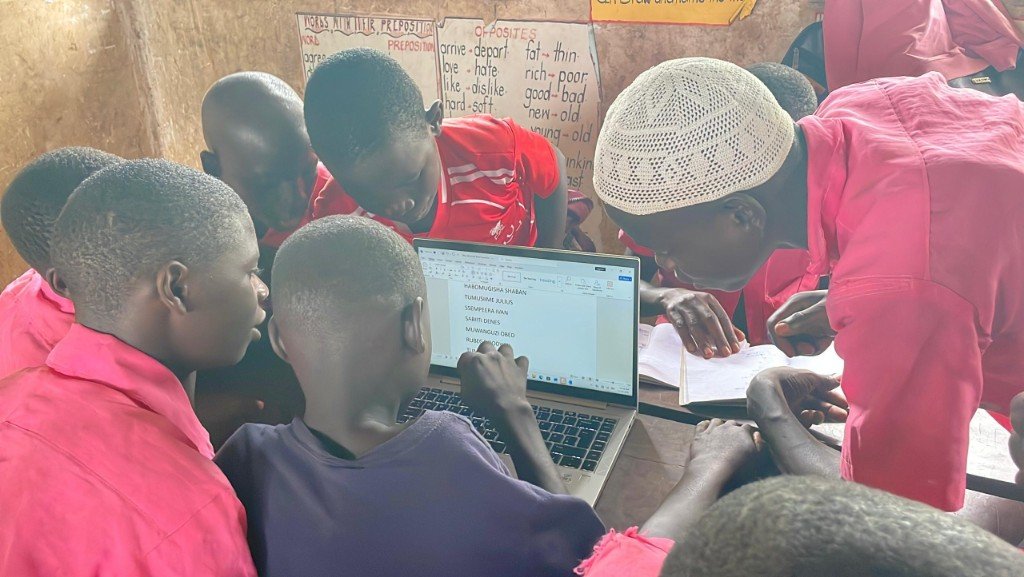
School digital learning sessions with shared laptops and guided practice.Learners building confidence through hands-on computer use.
School Digital Learning
We visit schools and organise digital camps, lessons and practical sessions with learners. We also engage teachers, headteachers and other school staff because they are important to keeping digital learning going after a camp or training session has ended. Activities can be arranged with a school to suit its timetable, learners' ages and the devices available.
What we teach and practise
Computer basics: identifying the parts of a computer, understanding what they do, switching devices on and off and handling equipment carefully.
Mouse and keyboard skills: clicking, scrolling, selecting, dragging and typing.
Using a computer: opening programmes, navigating the desktop, saving work, creating folders and finding files.
Typing and documentation: preparing simple letters, school assignments, lists and other documents; editing and formatting text.
Office applications: introductions to word processing, spreadsheets and presentations, based on the learners' level and available devices.
Internet and information: understanding how to search for information, use websites and identify information that may be misleading.
Digital safety: protecting passwords and personal information, recognising suspicious links and communicating respectfully online.
Creative and problem-solving activities: drawing, making simple presentations, exploring educational software and completing age-appropriate digital tasks.
STEM foundations: exploring science, technology, engineering and mathematics ideas through practical digital projects that relate to school subjects and everyday life.
Introductory coding: simple block-based or beginner coding activities that build logical thinking and problem-solving.
Robotics: hands-on robotics activities, where equipment allows, so learners can see how sensors, motors and instructions work together.
AI awareness: age-appropriate introductions to artificial intelligence - what it is, where learners may already meet it, and how to use digital tools thoughtfully and safely.
Who takes part: Primary and secondary school learners, teachers, headteachers, school administrators and other members of the school community.
How it happens: Learners work directly with devices in guided sessions. Where there are fewer computers than learners, they can take turns or work in small groups. We encourage practice and follow-up so that learners have a chance to use the skills again.
Working with teachers and school leaders
We help teachers practise basic computer use, prepare teaching and learning materials, organise information and explore suitable digital resources. We also work with school leaders on practical ways to use available technology for communication, records and school administration.
Community Digital Learning
Community Digital Learning takes place in villages and other community settings. We organise sessions for people who may not have had access to computer training or who use a smartphone without knowing many of its useful features. The sessions are open to different age groups and are planned around the interests and starting levels of participants.
What we teach and practise
Smartphone use: making calls, saving contacts, using settings, managing storage, taking and sharing photographs, installing and using useful applications and keeping a phone secure.
Computer basics: switching on a computer, using the mouse and keyboard, opening programmes and saving files.
Internet use: connecting to available networks, searching for information, using websites and accessing learning or public information resources.
Communication: using email, messaging applications and video calls, and sharing information appropriately.
Online safety: recognising scams and false information, avoiding suspicious links, protecting personal details and using strong passwords.
Digital documents: typing, preparing simple letters and forms, saving documents and sharing files.
Digital tools for livelihoods: using phones to communicate with customers, take product photographs, keep simple records, promote goods and look for useful farming or business information.
Accessing services: learning how to find and use relevant online services and information, with guidance appropriate to the participants.
STEM for community enterprise: practical science and technology ideas that help people understand tools, measurements, production and problem-solving in local work.
AI for small business: simple ways artificial intelligence and smart digital tools can help with writing messages, organising information, product ideas, customer communication and learning new skills - used carefully and with human judgement.
Digital marketing and visibility: preparing clear product photos, posts and messages so local businesses, farmers and creatives can reach more customers.
Who takes part: Parents and caregivers, mothers and fathers, children, young people, women and men, farmers, local leaders, community groups and other residents.
How it happens: A session may be organised as a community digital camp, a group lesson or a smaller practical gathering. Some participants may begin with how to use a smartphone; others may be ready to practise email, documents or online business promotion. We start from what people know and build from there.
Who this is for
Primary and secondary school learners
Teachers, headteachers, school administrators and other members of the school community
Parents and caregivers, mothers and fathers
Children, young people, women and men
Farmers, local leaders, community groups and other residents
How it connects
Digital Learning is delivered in two pathways: School Digital Learning and Community Digital Learning. It works hand in hand with Digital Rangers, who help mobilise learners and keep in touch with teachers and families. People who face extra barriers can also be supported through Digital Inclusion. Learners who need continued practice may use a Mobile Lab visit or, when one is available, a Community Hub.
We take opportunities to the people
Explore the rest of our programmes and projects, or get in touch about a school or community visit.